Apollo

Apollo

Apollo

Apollo

Setup Guide

Setup Guide

Setup Guide

Setup Guide

Updated Aug 4, 2025

Zan Laucius

Template Creator

Zan Laucius

Template Creator

Zan Laucius

Template Creator

Introduction

Thank you for purchasing the Apollo Template by Zan Creative.
This documentation is here to help you set up, customize, and get the most out of your new website.

Don’t have the template yet? Purchase it here.

Getting Started

To get starting customizing the template, you will want to replace the data in a few components. Go to the Assets panel and edit the following components

Dynamic Title

Replace the text layers within the Stack in Variant 1.

NavBar

Within the Name Stack, replace both Text layers with your name.


Home

Within the Layers panel, find and replace the following content:

ProfileImage

Replace the component image property with your own profile image.

ImagesTicker

Replace the image properties for PreviewCard1-4, found on the left side of the page. You will also need to replace the images for Preview1-Mobile - Preview4-Mobile with the same images.

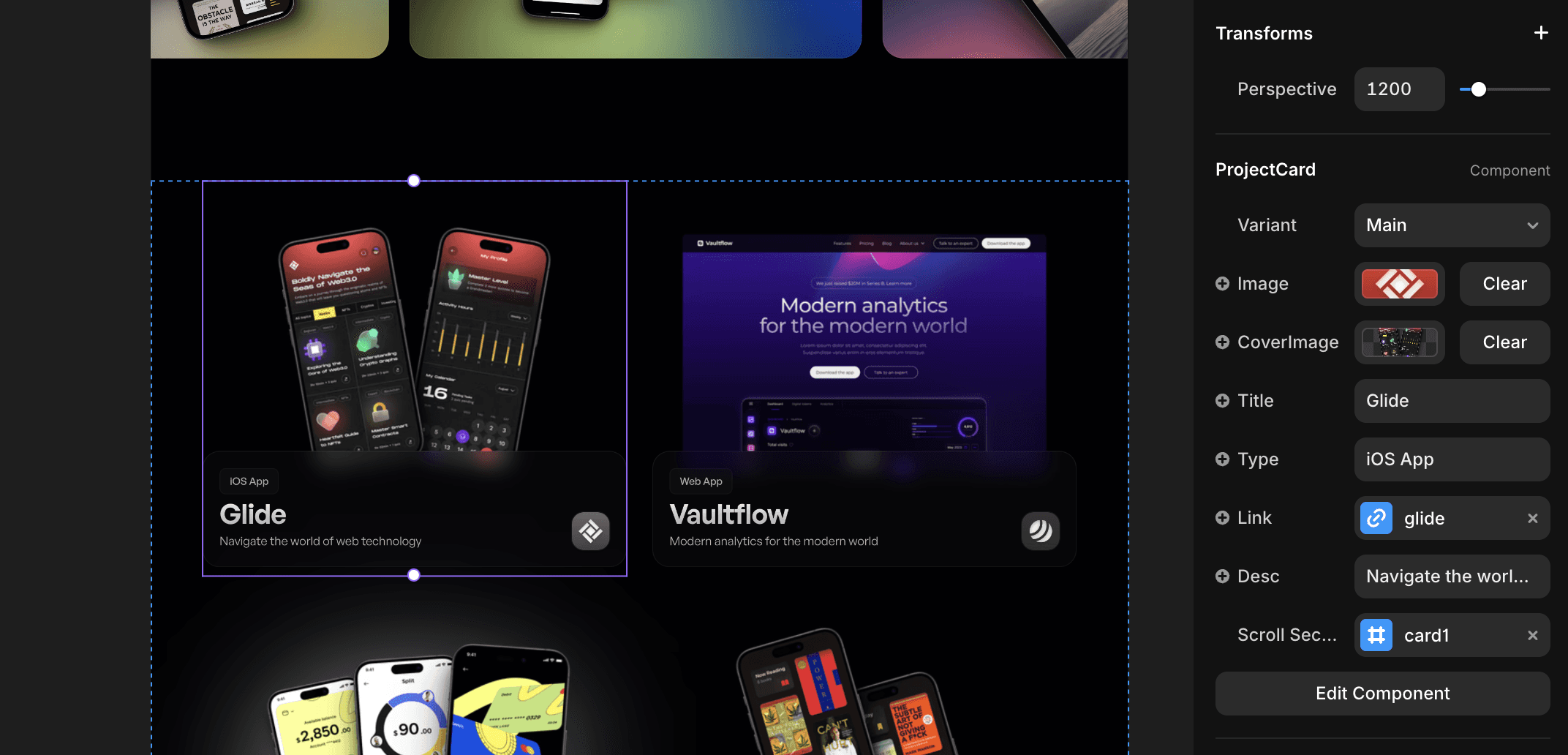
ProjectGrid

For each ProjectCard within Project Grid, you will need to replace the existing data for each component. The cards will look the best with a transparent PNG image used to display a preview of each project.

Tip: Use the website shots.so to easily generate mockups with a transparent background.
EmailCopy

Replace the email within the Email property of EmailCopy and EmailCopyMini.

ResumeDownloadButton

Replace the File property within the ResumeDownloadButton component to add download functionality for any file you'd like.

BottomGraphic

Within the GetInTouchSection, go to BottomGraphic and replace the image.

Footer

To customize the Footer, change the properties for each of the icons as well as the copyright property.

Projects (CMS)

To customize each Project CMS page, edit the data within the CMS collection.

AltLayout

After uploading your images and editing the text sections, try turning AltLayout to Yes and No to see which layout looks best for each page. This layout will change the location of certain images on the page.

Background

Edit the CMS field titled BackgroundTint to change which night sky background is shown.

You'll notice that for each CMS project, only one Layer with the prefix "Sky-" will be visible. Each layer will only be visible if the BackgroundTint field matches the condition set for each of these layers.

TechStack Icons

To specify which icons are showing in the TechStack component, fill in the Icons field with the names of the icons you'd like to show. Make sure to add a "," after each icon name within the field.
Frequently asked questions.

How do Framer templates work?

Framer templates give you a professionally designed website that you can fully customize—no coding required. After purchase, you’ll receive a template link that you can add to your Framer account and edit to fit your brand.

Do you offer support?

Yes! I offer email support to help with any questions related to your template setup and customization.

What happens after I purchase a template?

You’ll be automatically redirected to add the template to your Framer account. You’ll also receive an email confirmation with access details.

How long does it take to set up and launch my website?

Many customers launch their site within a few days—sometimes even faster. It depends on the type of template and how much you customize!

Do I need any design or coding experience?

Nope! Framer’s drag-and-drop editor makes it easy to customize your template without any design or coding skills.

What's included in my purchase?

- A Framer template link to add to your account - Lifetime updates to keep your template optimized - Email support for any setup questions - 3 months of free Framer Pro (Framer's hosting & advanced features)

Do I need a Framer subscription to launch my website?

No, you can use Framer for free. However, a Framer Pro subscription is required to connect a custom domain and unlock additional features.

What's your refund policy?

Due to the digital nature of these products, all sales are final. However, I’m happy to provide email support and lifetime updates to ensure you get the most out of your template.

Bring your vision to life.

Get started with a high-end, professional website today.

Frequently asked questions.

How do Framer templates work?

Framer templates give you a professionally designed website that you can fully customize—no coding required. After purchase, you’ll receive a template link that you can add to your Framer account and edit to fit your brand.

Do you offer support?

Yes! I offer email support to help with any questions related to your template setup and customization.

What happens after I purchase a template?

You’ll be automatically redirected to add the template to your Framer account. You’ll also receive an email confirmation with access details.

How long does it take to set up and launch my website?

Many customers launch their site within a few days—sometimes even faster. It depends on the type of template and how much you customize!

Do I need any design or coding experience?

Nope! Framer’s drag-and-drop editor makes it easy to customize your template without any design or coding skills.

What's included in my purchase?

- A Framer template link to add to your account - Lifetime updates to keep your template optimized - Email support for any setup questions - 3 months of free Framer Pro (Framer's hosting & advanced features)

Do I need a Framer subscription to launch my website?

No, you can use Framer for free. However, a Framer Pro subscription is required to connect a custom domain and unlock additional features.

What's your refund policy?

Due to the digital nature of these products, all sales are final. However, I’m happy to provide email support and lifetime updates to ensure you get the most out of your template.

Bring your vision to life.

Get started with a high-end, professional website today.

Frequently asked questions.

How do Framer templates work?

Framer templates give you a professionally designed website that you can fully customize—no coding required. After purchase, you’ll receive a template link that you can add to your Framer account and edit to fit your brand.

Do you offer support?

Yes! I offer email support to help with any questions related to your template setup and customization.

What happens after I purchase a template?

You’ll be automatically redirected to add the template to your Framer account. You’ll also receive an email confirmation with access details.

How long does it take to set up and launch my website?

Many customers launch their site within a few days—sometimes even faster. It depends on the type of template and how much you customize!

Do I need any design or coding experience?

Nope! Framer’s drag-and-drop editor makes it easy to customize your template without any design or coding skills.

What's included in my purchase?

- A Framer template link to add to your account - Lifetime updates to keep your template optimized - Email support for any setup questions - 3 months of free Framer Pro (Framer's hosting & advanced features)

Do I need a Framer subscription to launch my website?

No, you can use Framer for free. However, a Framer Pro subscription is required to connect a custom domain and unlock additional features.

What's your refund policy?

Due to the digital nature of these products, all sales are final. However, I’m happy to provide email support and lifetime updates to ensure you get the most out of your template.

Bring your vision to life.

Get started with a high-end, professional website today.

Frequently asked questions.

How do Framer templates work?

Framer templates give you a professionally designed website that you can fully customize—no coding required. After purchase, you’ll receive a template link that you can add to your Framer account and edit to fit your brand.

Do you offer support?

Yes! I offer email support to help with any questions related to your template setup and customization.

What happens after I purchase a template?

You’ll be automatically redirected to add the template to your Framer account. You’ll also receive an email confirmation with access details.

How long does it take to set up and launch my website?

Many customers launch their site within a few days—sometimes even faster. It depends on the type of template and how much you customize!

Do I need any design or coding experience?

Nope! Framer’s drag-and-drop editor makes it easy to customize your template without any design or coding skills.

What's included in my purchase?

- A Framer template link to add to your account - Lifetime updates to keep your template optimized - Email support for any setup questions - 3 months of free Framer Pro (Framer's hosting & advanced features)

Do I need a Framer subscription to launch my website?

No, you can use Framer for free. However, a Framer Pro subscription is required to connect a custom domain and unlock additional features.

What's your refund policy?

Due to the digital nature of these products, all sales are final. However, I’m happy to provide email support and lifetime updates to ensure you get the most out of your template.

Bring your

vision to life.

Get started with a high-end, professional website today.